Campfire Alternative
Penpoint vs Campfire: a Campfire alternative that fills itself in
Campfire gives you eighteen modules and a blank form in each one. Here is what that depth buys, what it costs to keep, and why Penpoint reads your world out of the chapters instead.
Last checked: September 2026, against Campfire's pricing page and Update 43
The short answer
Campfire is the deeper worldbuilding tool, and it is not close. Eighteen modules, interactive maps, family trees, free collaborators, a mobile app, and a storefront you can sell finished books through.
Penpoint is the better place to turn a draft into a story bible. Point it at chapters you have already written and it proposes the characters, locations, and items itself.
Campfire is $19.00 a month, or $420.00 once. Penpoint is $40 once.
Penpoint vs Campfire at a glance
← Scroll to compare →
| Penpoint | Campfire | |
|---|---|---|
| Price | $40 once | $19.00/mo, or $420.00 once |
| Free tier | No, a 14-day trial | Yes, with per-module caps |
| Free manuscript limit | No limit | 25,000 words |
| Where your book lives | A file on your drive | Your Campfire account |
| If you stop paying | Nothing changes | Work past free limits is read-only |
| Platforms | Windows, macOS, Linux | Browser, Mac, Windows, iOS, Android |
| Linux | Yes, AppImage and .deb | Browser only |
| Works offline | Yes, always | Desktop yes, mobile no |
| Worldbuilding coverage | Nine kinds of entries | Eighteen modules |
| Interactive maps | No | Yes, with pinned locations |
| Manuscript export | Word, PDF, EPUB, RTF, Markdown, text | EPUB and PDF |
| Built-in spellchecker | Yes, offline, 60 languages | Not mentioned anywhere |
| Builds your story bible from your prose | Yes | No |
| Collaborators | No | Unlimited, and they can be free accounts |
| Mobile app | In beta testing, not on the stores | Yes, free, needs a connection |
| Sell finished books to readers | No | Yes, up to 80% royalties |
What Campfire gets right
Campfire calls itself "The Most Customizable Writing App, With the Most Affordable Pricing," and the first half of that is not marketing. Eighteen modules cover Manuscript, Characters, Timeline, Maps, Calendar, Encyclopedia, Magic, Languages, Research, Locations, Arcs, Relationships, Items, Species, Cultures, Philosophies, Religions, and Systems. Each one holds what Campfire calls elements: one character sheet is one Character element, one family tree is one Relationships element.
The depth is real. Maps carry pinned locations that link back to the articles describing them. Languages includes conlang tooling that got the first of two planned redesigns in 2025. Species, Cultures, Philosophies, Religions and Systems exist as their own dedicated modules rather than as folders you name yourself. If your world has five religions and three magic systems in it, that structure earns its keep.
Their free tier is unusually honest for this category. No credit card, unlimited storage, private projects that stay private without paying, and every module available with element caps rather than lockouts. The desktop app is free to download for Mac and Windows and has an offline mode. The mobile app, CF Creators, is free on iOS and Android.
Collaboration is free too, and generous. Invite as many people as you want to view, comment on, or edit, and they only need a free Campfire account of their own. There is a publishing storefront on top of that, paying up to 80% royalties on digital sales at or above $2.99, with a reading app and gift cards attached to it.
Development is steady. Update 43 shipped in August 2026 with a project dashboard refresh and a Spanish translation, and the numbered updates before it reworked the Encyclopedia, the Languages module, and the publishing dashboard.
Why writers look for a Campfire alternative
The reasons are narrow, and Campfire has already written down the first one.
Eighteen modules is a lot of blank forms
On their own comparison page, under a heading called "Cons of Using Campfire," Campfire says this:
"Campfire has so many modules that it can seem a bit overwhelming at first glance. ... The learning curve can be intimidating for sure, and for those of us out there that love to look at pretty things, it can be easy to fall victim to customizing the layout and theme instead of actually writing."
That is their assessment, in their published copy, and it matches what people report: many writers end up using a handful of the eighteen and leave the rest empty. The modules are good. They are also all waiting for you to fill them in before they do anything, and filling them in is not writing.
The free manuscript stops at 25,000 words
Campfire's free plan includes the Manuscript module, capped at 25,000 words. Ten characters, two maps, five locations, twenty timeline events, one calendar, three arcs. Those worldbuilding caps are workable for a while. The manuscript cap is roughly a quarter of a novel.
And the caps are not only about what you can add. Their pricing page states that when a subscription ends, every element beyond the free plan limits becomes read-only. The work is still there and still readable. It just stops being a document you can edit.
Buying it piecemeal costs the same as buying it whole
Campfire sells modules individually, which sounds like the flexible option and is where most of the confusion lives. The individual lifetime prices run from $7.50 for Religions up to $45.00 for the Manuscript module.
Add all eighteen together and you get $420.00, which is exactly the price of the Standard Lifetime package.
So a custom plan never saves money by buying carefully. It saves money only by leaving modules out, and their FAQ is clear about what that costs: a custom lifetime package receives updates to "only the modules you select, not future ones we may release," while the Standard Lifetime package "also includes future modules we may develop and release." Choosing à la carte means predicting today which of eighteen tools you will never want, and being wrong quietly forfeits everything Campfire builds later. The à la carte option also exists only on the lifetime plan; monthly and annual are all or nothing.
The word processor gets less attention than the world around it
Of the last eight numbered updates, one was substantially about the Manuscript module: Update 37 in January 2025, which added commenting, version history, an Index Card View, and word-count goals. The other seven went to the Encyclopedia, Languages, publishing, panels, dashboards, catching the mobile app up to the desktop one, and translation.
It shows in the details a drafting writer notices. Compiled export is EPUB and PDF. Campfire does not mention a spellchecker of its own anywhere on its word processor page, its FAQ, or its update posts. And writers who leave Campfire tend to leave for Scrivener, describing what they want as a more polished writing experience.
Where Penpoint is different
Campfire hands you eighteen empty modules and asks you to describe your world before you write it; Penpoint reads the world back out of the prose once you have. Both approaches work. They suit opposite kinds of writer.
The Chapter Scanner builds the bible from the draft
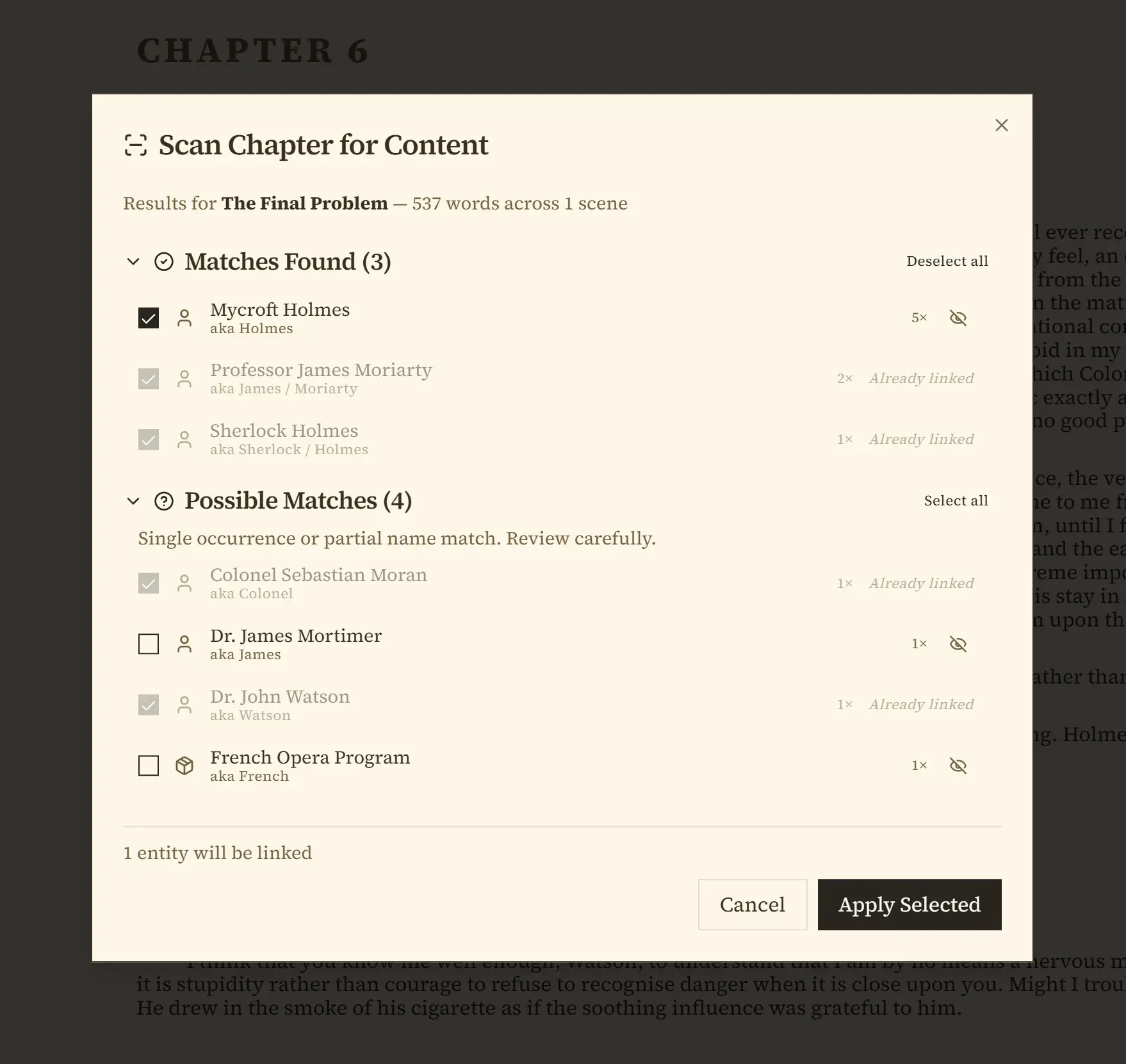
The Chapter Scanner reads a chapter you have already written and pulls the people, places, and things out of the prose. You run it from a button called Scan Chapter for Content. Names it already knows come back as matches and possible matches, ready to link to that chapter. Names it has never seen come back as new discoveries, and those get added to your book if you accept them. It does not guess silently, and nothing is written until you approve it.
This is the part that does not exist in a module-first tool. Campfire's Manuscript module can tag elements you have already created; it has nothing that creates them from the text.
Import that arrives already in chapters
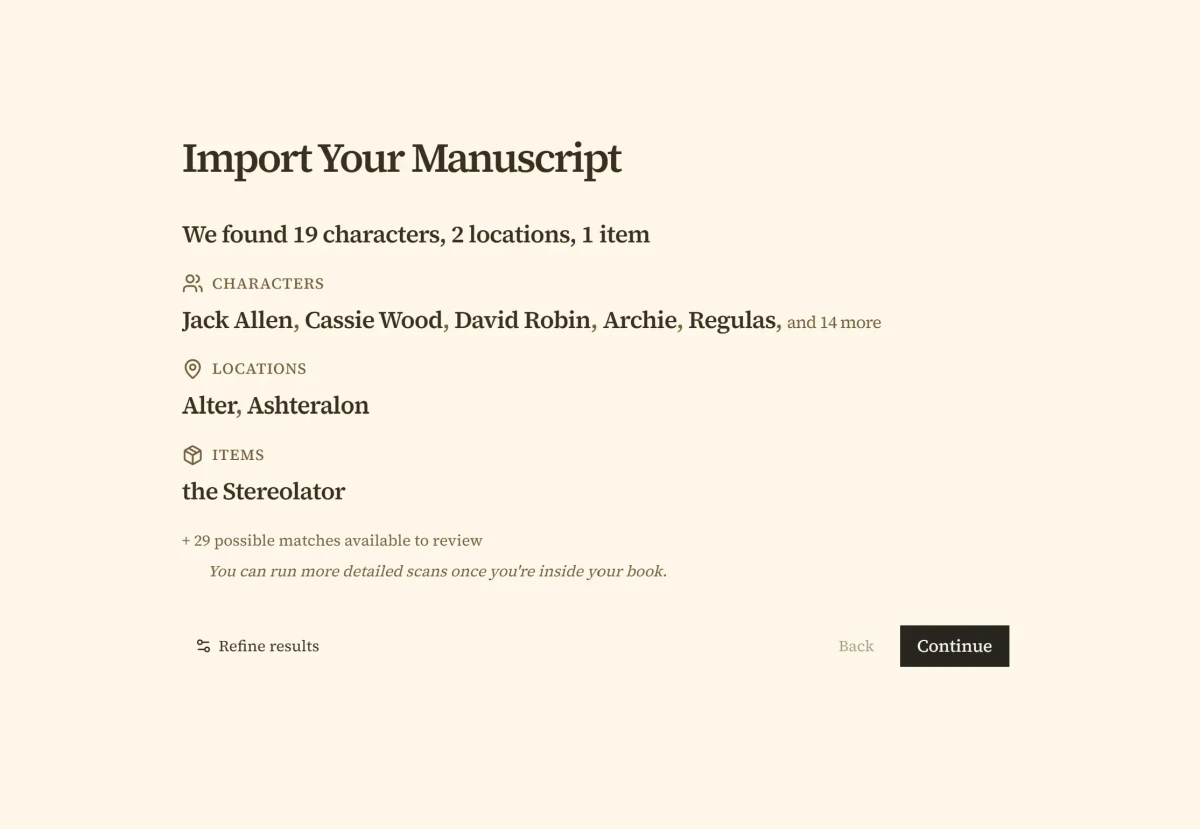
Import reads Word, EPUB, RTF, Markdown, and plain text, and finds your chapter breaks from eleven different heading and text patterns rather than making you split the file by hand. It shows you the split it found before writing anything.
Export runs the same way out: Word, PDF, EPUB, RTF, Markdown, or plain text, chapter structure intact.
A spellchecker that has read your book
Penpoint ships an offline spellchecker covering 60 languages, and the moment you create a character called Aldric, Aldric stops being underlined in red. Names enter the dictionary because the character is already in your book, not because you added them one at a time.
Nine kinds of entries, and what they let you do
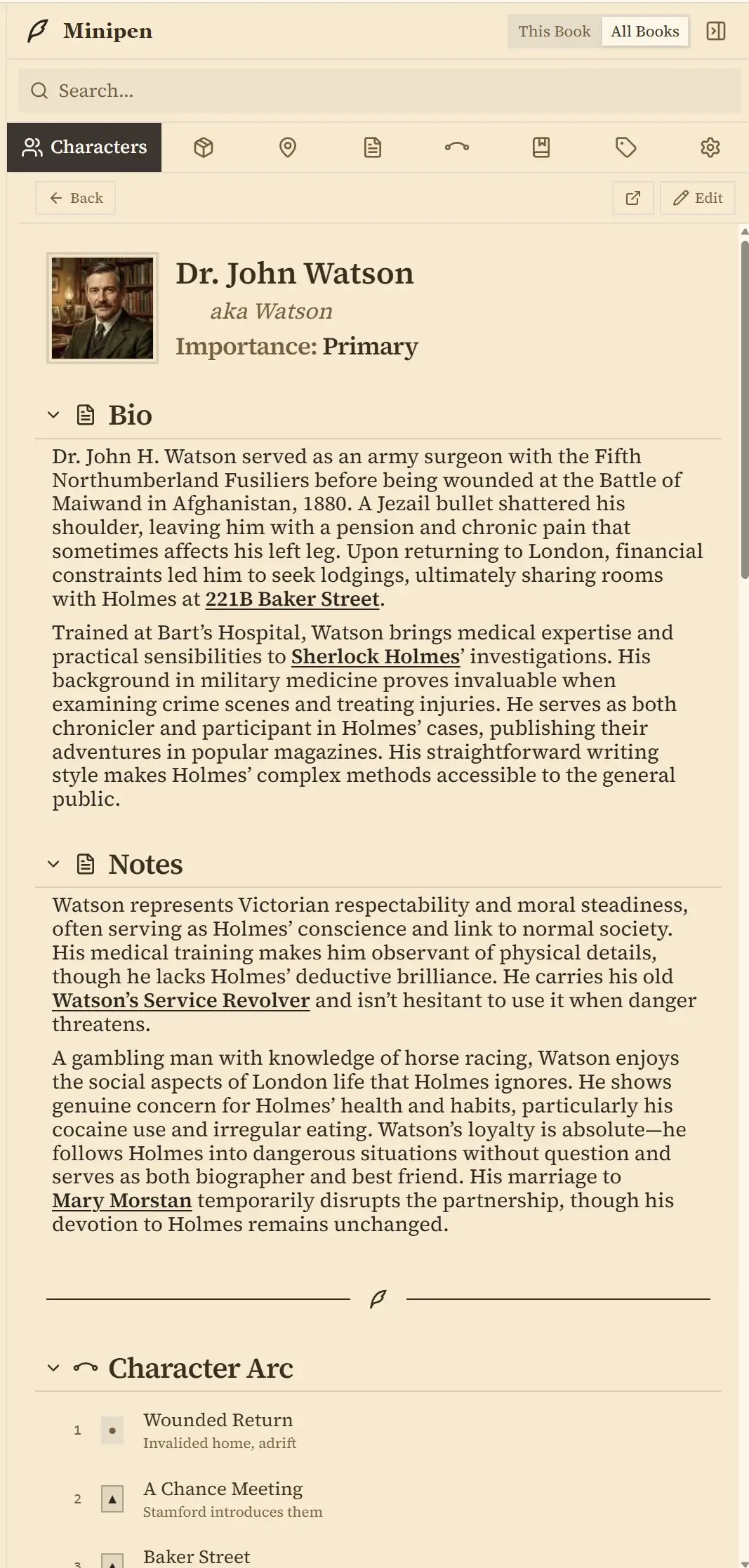
Characters, locations, items, chapters, arcs, tags, notes, timeline events, and calendars are entries the app understands rather than pages you format. Minipen keeps them beside your prose while you write. Locations nest, items have owners, and a relationship map draws who knows whom.
Custom calendars let a year have thirteen months, and the timeline does its arithmetic in that calendar. For a series, Series Arcs run a thread across several books while every book keeps its own chapters, and one cast, one set of locations, and one tag list are shared across all of them automatically.
Nothing to renew, and nothing that goes read-only
A Penpoint book is a single .penpoint file on your disk. Campfire keeps your manuscript and every element inside your Campfire account instead, which is exactly what makes the phone, the collaborators, and the storefront work, and also what puts your writing within reach of a lapsed subscription. Penpoint's writing needs no account and no connection, the $40 covers Windows, macOS, and Linux together, and Linux is a real supported version, not an afterthought, shipped as an AppImage and a .deb.
Campfire has been fair about this in its own history. When it retired its old desktop product, Campfire Pro, in January 2022, it told anyone who already owned a copy that they "can use it as much as you like," wherever they had downloaded it from. That is the right way to retire software, and it is also the argument for a file. Pro kept working because it was already on people's machines.
What Campfire still does better than Penpoint
Most of the worldbuilding, and several things we have no version of at all.
Maps
Penpoint has no map feature. Not a smaller one: none.
Campfire's Maps module pins locations onto an image and links each pin back to the element describing it, which is the single most common thing fantasy writers ask us for and cannot have.
Five modules with no counterpart here
Species, Cultures, Philosophies, Religions, and Systems are built-in modules in Campfire and absent in Penpoint. So is the conlang tooling in the Languages module. You can approximate some of it in our Notebook, which is not the same as a dedicated page with its own built-in slots for details.
Writing with other people, and writing on a phone
Campfire's collaborators are unlimited and free, and they can comment, edit, and be tagged in the manuscript. Penpoint has no collaboration at all.
The phone is closer than it was. A Penpoint mobile companion entered beta testing in July 2026 in a private early-access program for iPhone and Android, but it is not on the public app stores and it needs a Penpoint Cloud subscription to carry your books onto the device. It reads and writes rather than only displaying. Campfire's mobile app is free, public, and works with a free account, so on a phone today Campfire is the one that works.
An audience, and a way to get paid
Campfire publishes finished books, sells them, and pays up to 80% royalties. Penpoint exports a file and wishes you luck.
A free tier that is actually free
No card, unlimited storage, private projects, every module available. Penpoint has a fourteen-day trial and then a price. For a writer who is not sure yet, Campfire's offer is friendlier.
Which one should you choose?
It comes down to whether the world arrives before the words or after them.
Choose Campfire if
- You want maps with pinned, linked locations
- Species, cultures, religions and magic systems each need their own structured home
- Someone else writes, edits, or comments in your project
- You want to sell finished books and keep most of the royalty
- You write on a phone as much as at a desk
- Building the world is the part you enjoy most
If you like filling in a rich form for every idea, this is the better home and it is not a close call.
Choose Penpoint if
- You already have chapters and want the bible built from them
- Blank forms make you close the app
- You would rather pay $40 once than $19 a month
- You want the draft out as Word, not just EPUB and PDF
- You write on Linux, or with no connection at all
- Nothing you write should ever stop being editable
Try it free for fourteen days. Every feature unlocked, no account and no credit card.
Penpoint and Campfire pricing compared
| Penpoint | Campfire | |
|---|---|---|
| Monthly | Not offered | $19.00 |
| Yearly | Not offered | $160.00 |
| Pay once | $40.00 | $420.00 |
| Cheapest single module | No modules | $7.50 lifetime |
| Five years | $40.00 | $800.00 on the annual plan |
| Refund | 30-day money-back guarantee | 30 days on annual and lifetime |
Campfire discounts these figures on its own pricing page, and a discount showing today may not be showing when you read this, so the list prices are what the table carries: $19.00 a month, $160.00 a year, or $420.00 once. The cheapest single module is $7.50 for a lifetime license to Religions, Species, Cultures, or Philosophies.
Five years on the annual plan comes to $800.00 against Penpoint's $40.00, and paying once closes that gap to $420.00 against $40.00. Campfire refunds annual and lifetime purchases within 30 days, though not monthly ones. Penpoint's 30-day money-back guarantee covers its single purchase, and updates are included.
Penpoint vs Campfire: common questions
How do I move a book from Campfire into Penpoint?
Campfire exports a finished manuscript as EPUB, and Penpoint imports EPUB directly, so the manuscript itself moves in one step. Penpoint shows you the chapters it found before it writes anything, so you can fix the split first. Your Campfire modules are separate from the manuscript and do not travel inside that export, but Penpoint's Chapter Scanner can rebuild much of that from the prose once the book is in. Installing Penpoint moves nothing and deletes nothing, so you can run both while you decide.
What happens to my writing if I stop paying for Campfire?
Campfire's own pricing page states that after a subscription ends, every element beyond the free plan limits becomes read-only. Your work is not deleted and you can still read it, but a manuscript over 25,000 words stops being editable past that point. Penpoint works differently: the app is a one-time purchase and your book is a file on your disk, so nothing expires and no chapter stops being editable.
Is Campfire's writing tool free?
Campfire has a real free tier with no credit card required, and the Manuscript module is part of it, capped at 25,000 words. Most novels run three to four times that length, so finishing a book on the free plan is not the intended path. Penpoint has no free tier, just a fourteen-day trial with every feature unlocked and a one-time $40 purchase after that.
Does Penpoint have interactive maps?
No. Penpoint has no maps at all, and Campfire's Maps module is built around the thing Penpoint cannot do: drop a pin on an image and have it open the element describing that place. A writer who navigates a world visually should pick Campfire.
Is Penpoint a subscription?
No. Penpoint is a one-time $40 purchase covering Windows, macOS, and Linux, with a 30-day money-back guarantee, and the desktop app never asks for a renewal. Penpoint Cloud, the optional backup and sync service, is a separate subscription the desktop does not require. Campfire lists $19.00 a month, $160.00 a year, or $420.00 once for its Standard Lifetime package.
Does Campfire work offline?
Campfire's desktop app for Mac and Windows has an offline mode and is free to download, so yes on a laptop. Its mobile app states that an internet connection is required, and there is no Linux build. Penpoint is a desktop program that never needed a connection at all, on Windows, macOS, and Linux alike.
Can I write with a co-author in Penpoint?
No. Penpoint is a single-writer desktop app with no shared editing and no invited collaborators, and its inline comments are notes to yourself. Campfire lets you invite as many collaborators as you like to view, comment, or edit, and they only need a free Campfire account rather than a paid one. If someone else works in your project, that is a straightforward reason to choose Campfire.
What formats can Campfire export a finished manuscript as?
Campfire's word processor page lists EPUB and PDF for a compiled manuscript. Individual elements can also be exported as DOCX according to their FAQ, though that is described for single elements rather than a whole compiled book. Penpoint exports a manuscript as Word, PDF, EPUB, RTF, Markdown, or plain text.
Does Penpoint run on Linux?
Yes. Penpoint runs natively on Linux, shipped as an AppImage and a .deb package, built and tested alongside the Windows and macOS versions. Campfire's desktop app is Mac and Windows only, so Linux users are on the browser version.
Can I try Penpoint before buying?
Yes. The Penpoint trial runs fourteen days with every feature unlocked, and needs no account and no credit card. Campfire's free tier needs no card either, so you can keep a Campfire account open and trial Penpoint at the same time with the same book.
Your manuscript and your world, in one file.
Every feature for 14 days, with no account and no card. $40 once after that, for Windows, macOS, and Linux together.
Join our Discord