Dabble Alternative
Penpoint vs Dabble: a Dabble alternative you buy once
Dabble left worldbuilding out on purpose, and says so. Here is what that decision buys, what it costs, and the things Dabble still does better than we do.
Last checked: September 2026, against Dabble 3.0
The short answer
Dabble is a better place to write with other people. Real-time co-authoring, track changes, and a browser that runs on any machine you happen to be sitting at. Nothing in Penpoint competes with that.
Penpoint is a better place to keep a complicated world straight. Characters, locations, items, and events are entries the app understands, with a relationship map, a timeline, and calendars built on top of them.
Dabble is $19 a month, or $699 once. Penpoint is $40 once, for every platform you own.
Penpoint vs Dabble at a glance
← Scroll to compare →
| Penpoint | Dabble | |
|---|---|---|
| Price | $40 once | $19/mo, or $699 once |
| Where your book lives | A file on your drive | Your Dabble account |
| Platforms | Windows, macOS, Linux | Any browser, installs to desktop and phone |
| Real-time co-authoring | No | Yes, with track changes and four roles |
| Character entries | Yes | Yes |
| Location and item entries | Yes, with nesting and ownership | Notebook pages you write yourself |
| Relationship map | Yes | No |
| Timeline view | Yes | No |
| Custom calendars | Invented months, eras, moons | No |
| Builds your story bible from your prose | Chapter Scanner | No |
| Plotting board | Corkboard, outliner, story arcs | Plot Grid |
| Version history | Snapshots and per-scene drafts, compared side by side | Time Machine slider, paid plans |
| Import | Word, EPUB, RTF, Markdown, text | Word, RTF, Markdown, HTML |
| Export | Word, PDF, EPUB, RTF, Markdown, text | Word, Google Docs, web page, Markdown |
| Works offline | Always | Yes, saves locally first since 2026 |
| If you stop paying | Nothing changes. You own it | Read and export forever, no new words |
| Free trial | 14 days, no card | 14 days, no card |
| AI on your prose | None | None |
What Dabble gets right
Dabble calls itself “the only writing tool designed for aspiring and seasoned fiction authors,” and its homepage is unusually direct about the problem it thinks it is solving. Of Scrivener it says “extensive features you don't need and can be overwhelming.” It lists what goes wrong elsewhere too: drowning in formatting, losing plot points, and “getting sidetracked by too many features, so many buttons, so little focus.” That is a product with an opinion, and Dabble executes it well.
Focus Mode strips the screen to the page, auto-fade dims the interface after you have typed for a while, and typewriter scrolling keeps the line you are working on in the middle of the screen. Goals and sprints track a deadline and tell you the daily word count it implies. The Plot Grid lays your threads out as columns and your beats as cards, and can be linked to the manuscript so the scene order stays in step.
In July 2026 they rewrote the whole application, and the rewrite brought the things a cloud app should have had all along: real-time co-authoring, track changes, threaded comments, review copies for beta readers, and version history you can scrub through. They have shipped more than seventy releases in the two months since. This is not an abandoned product.
Dabble is AI-free, and its documentation says so without hedging: “Dabble is AI-free, and that is a deliberate choice we stand behind.” It also refuses to sell itself through an app store: “Looking for Dabble in the App Store? You won't find it there, and that's on purpose.” We take the same two positions.
Why writers look for a Dabble alternative
Fewer features is the promise, and Dabble keeps it. Whether that suits you comes down to which features it left out.
Your world is filed under “everything else”
Dabble has exactly one kind of structured entry, and it is Characters: a name, a one-line description, an excerpt, a portrait, grouped into casts. Everything else in your world goes into the Notebook, which their own documentation describes as “your free-form space for everything else: worldbuilding, magic systems, locations, factions, research you've pasted or linked, and brainstorms that don't yet have a home.” Dabble organizes your story, and characters are structured because characters are the story. A tavern, a sword, a treaty, and the date the war started are filed as writing about those things rather than as the things themselves. For a lot of novels that is the right call.
It stops being the right call the moment you need the app to answer a question instead of hold a paragraph. Which characters have met? Where was this item when chapter nine happened? How long after the coronation is the siege? A page of prose cannot answer those. An entry can.
You are renting the place your book lives
Dabble's Writer plan is $19 a month, Author is $29, Bestseller is $49, and lifetime access is a one-time $699. Three years on the Writer plan comes to $684, which is close to the lifetime price and roughly seventeen times what Penpoint costs.
What lapsing actually costs you gets repeated inaccurately, including by people recommending us. Dabble's pricing page says “You have access to your work forever. Sign in to view and export your books any time after your subscription ends.” Your writing turns read-only, not inaccessible. What you stop being able to do is add new words.
Nothing reads the draft back to you
Dabble's @mentions are good, and they are better than ours in one specific way: they work inside the manuscript and they follow a rename. Their documentation says mentions “stay current,” and renaming a linked document updates every mention of it automatically.
But a mention is something you type, and typing one means already knowing it belongs there. Nothing in Dabble reads the ninety thousand words you have already written and tells you who is in them.
Where Penpoint is different
Dabble stores writing about your world: paragraphs in the Notebook. Penpoint stores the world itself, as entries the app understands, with details and connections built in. The difference shows up the moment you want the app to tell you something you did not already type.
Locations and items are entries, not pages
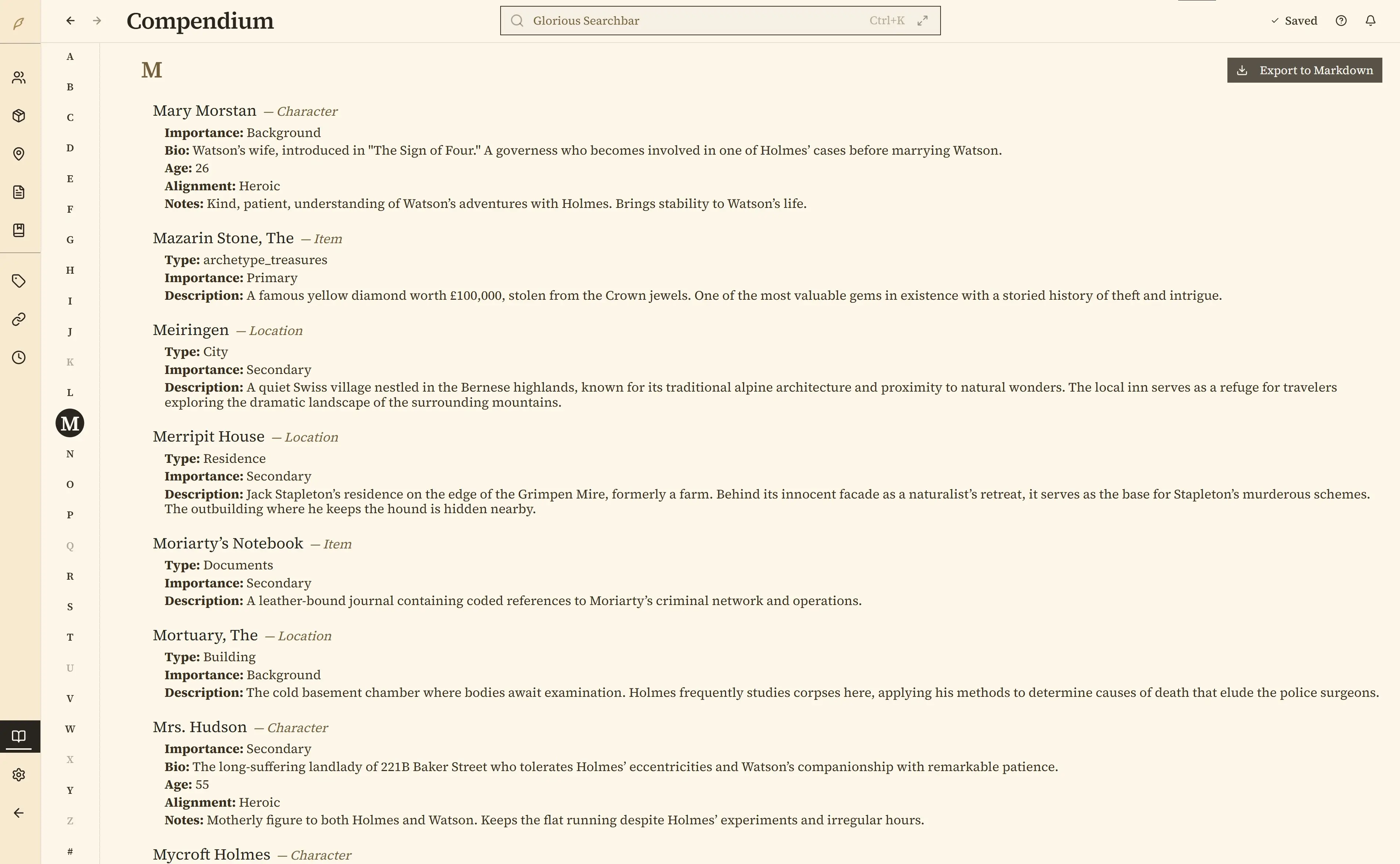
A location in Penpoint sits inside another location, so a cellar belongs to a tavern, which belongs to a city, which belongs to a kingdom. An item knows who owns it and where it is now. An event sits on a date, and the date can belong to a calendar you invented, with its own months, weekdays, leap days, eras, and up to eight moons. Rich-text tables hold magic systems, faction grids, and stat blocks. The Compendium keeps an alphabetical index of all of it, updated as you write, and Ctrl+K searches your prose and your entries together.
The views that only exist because your world is organized
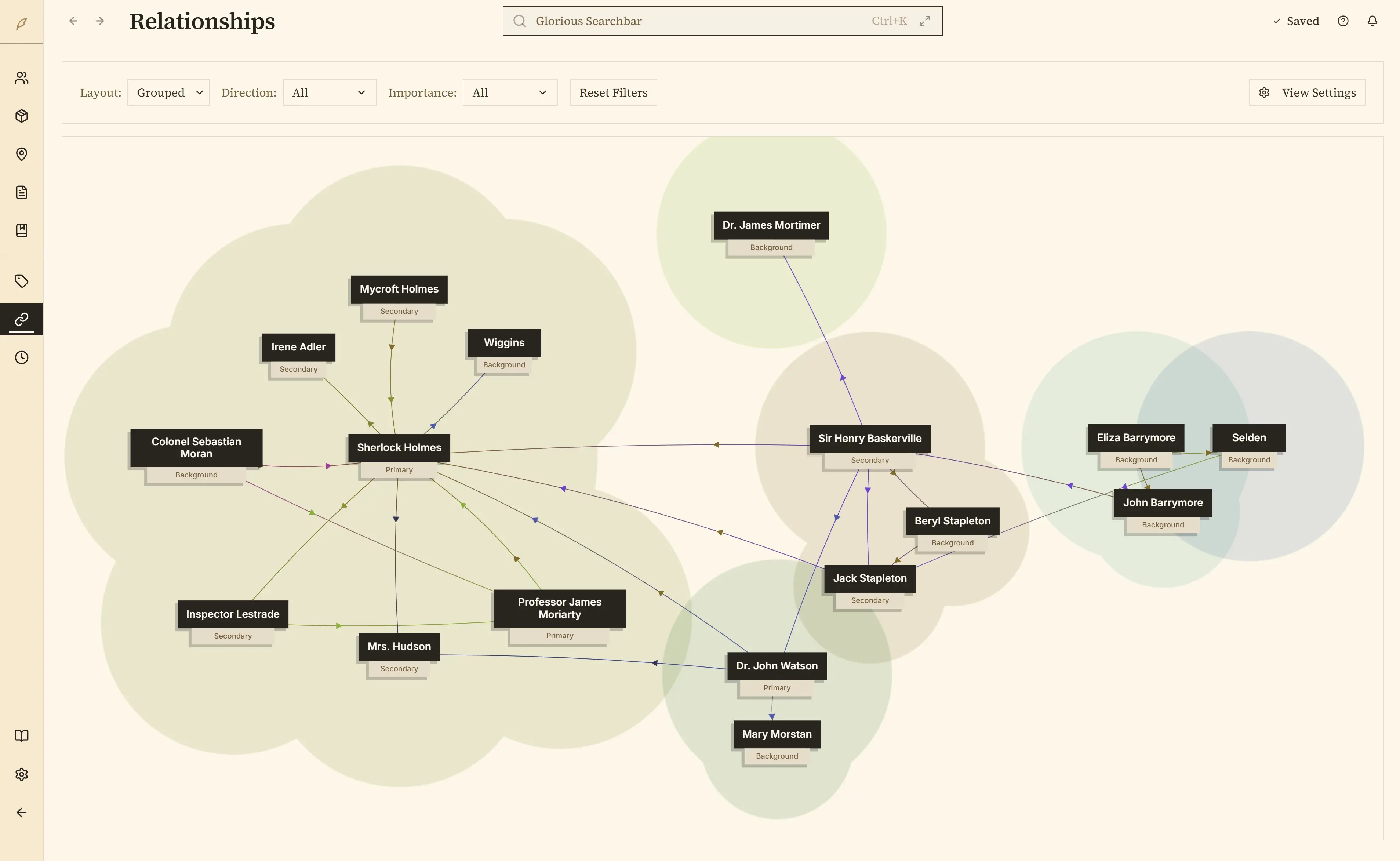
This is the part that cannot be retrofitted onto free-form notes.
Because characters are entries with relationships, Penpoint can draw a relationship map of the whole cast. Because Penpoint tracks which characters appear in each scene, it can draw a timeline of who shows up across which chapters, which is usually where you notice somebody vanished for nine of them.
Story structure is plotted as layered arcs with keyframes at each turning point, and a character's emotional fortune can be tracked as a curve and laid over someone else's. There is a corkboard and an outliner as well, for the plotting Dabble does with the Plot Grid.
The Chapter Scanner
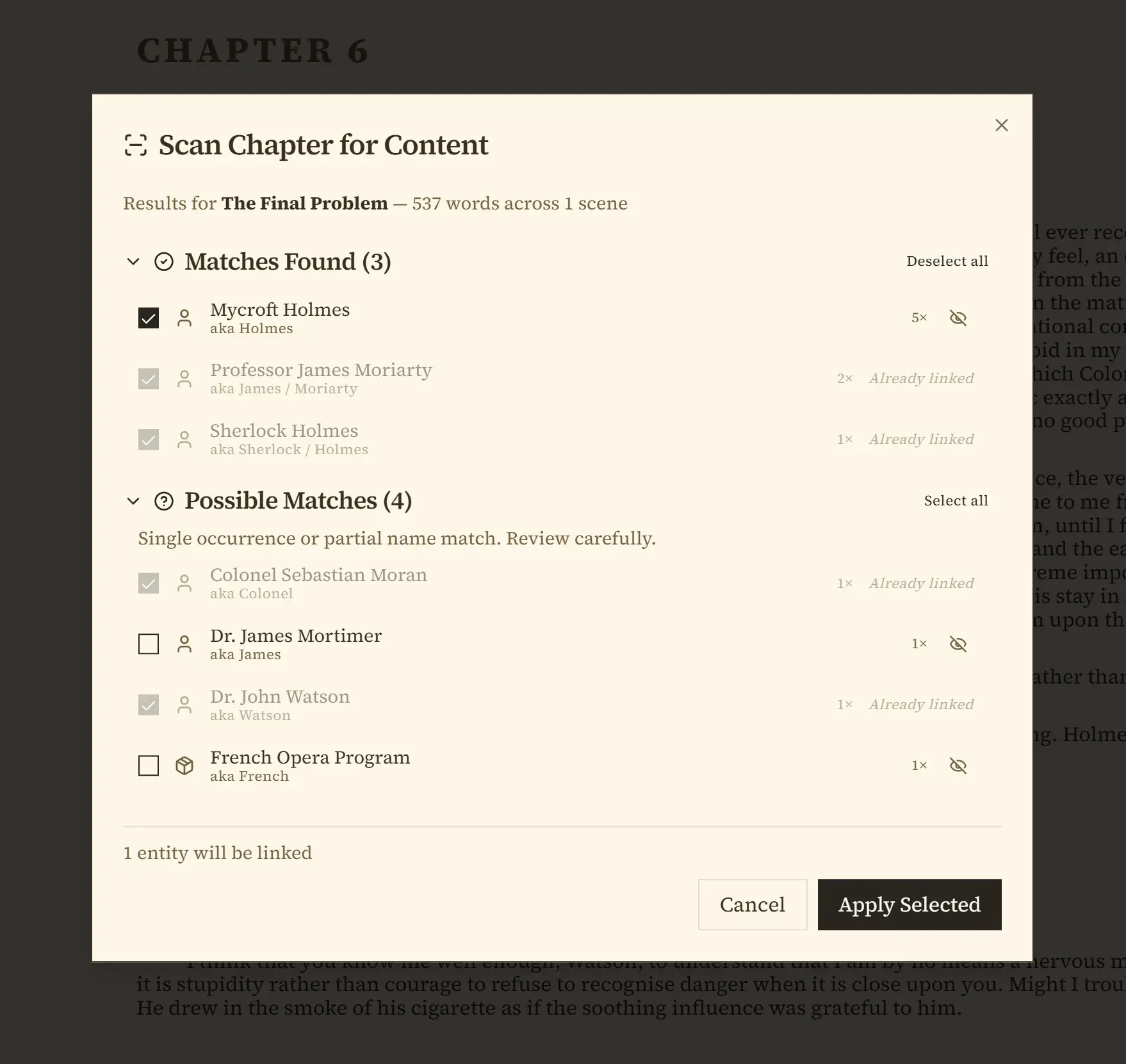
Right-click a chapter and Penpoint reads your prose, finds every character, location, and item mentioned, and offers to create the ones that do not exist yet. Export a finished draft out of Dabble, import it here, and you can have a filled-in story bible the same afternoon rather than typing it in over a fortnight.
It does not guess silently. Results come back in two groups: confident matches, and possible matches, which are the single mentions and partial name hits it wants you to look at. Nothing is created until you tick it and press Apply.
Your book is a file you own
A Penpoint book is a file on your drive. You can copy it to a USB stick, put it in a folder with your research, back it up however you already back things up, and open it in ten years without asking anyone's permission. Writing needs no account and no connection: turn the Wi-Fi off and nothing about the app changes. The $40 covers Windows, macOS, and Linux together, and Linux is a real supported build, an AppImage and a .deb, compiled and tested alongside the other two.
What Dabble still does better than Penpoint
Five things, and the first two are not gaps we are working on. Penpoint does not do them at all.
Writing with another person
Dabble has real-time co-authoring: live cursors, track changes, threaded comments, and four roles, so an editor's changes arrive as suggestions rather than edits. Review Copies let you hand a beta reader an isolated copy and merge their notes back into the manuscript afterward. Penpoint has none of this. Its inline comments are notes to yourself.
If your book is a two-person job, or you work with an editor inside the same tool, choose Dabble.
Writing on whatever is in front of you
Dabble runs in a browser and installs to a phone, a tablet, a Chromebook, and all three desktop operating systems. Penpoint is desktop only: no web version, no mobile app. That rules us out for anyone whose writing time happens away from their own desk.
Version history you can scrub through
Dabble's paid plans keep automatic and named versions with a Time Machine slider, and let you restore a whole project or pull a single document forward. Penpoint has whole-manuscript snapshots and per-scene drafts, which cover the same fear, and it compares a draft against the current text side by side with the changes marked. What it has no answer to is that slider: there is no timeline of automatic versions to slide back through.
Getting a book to other people
Dabble exports to Word, Markdown, straight into Google Docs, or as a shareable web page, which is a convenient way to send three chapters to somebody. It has no PDF button, and their documentation sends you to Print and then Save as PDF instead.
Penpoint exports Word, PDF, EPUB, RTF, Markdown, and plain text directly, but has nothing like the web link.
A series, which both of us do properly
This one is a draw.
Scrivener makes you rebuild the cast in a new file for every book; neither of these two does. One Dabble project holds several books, and their documentation is clear that “your Characters, your Notebook, and your plots stay shared across every book.” Penpoint shares characters, locations, items, tags, and notes across a series while each book keeps its own chapters and arcs. The difference is at the edges: Penpoint adds a presence setting per book, so a character can be in book three and not book one, and Series Arcs for threads running the whole saga.
Which one should you choose?
Neither app is worse than the other. The split is whether your difficulty is the writing or the world, and whether anyone else is in the document with you.
Choose Dabble if
- Someone else writes or edits in the same manuscript
- You write on a phone, a tablet, or a machine you do not own
- You want the fewest possible buttons between you and the page
- Your world fits comfortably in a folder of notes
- You want to scrub back through old versions
- Sending an editor a live link matters more than owning a file
If your writing happens in three places on two devices, this is not a close call.
Choose Penpoint if
- You keep losing track of who knows what, and when
- Your locations, items, and dates need to be things, not pages
- You want a relationship map, a timeline, or an invented calendar
- You have a finished draft and want the story bible built from it
- You would rather pay $40 once than $19 a month
- You want the book to be a file you own, on a disk you own
Try it free for fourteen days. Every feature unlocked, no account and no credit card.
Penpoint and Dabble pricing compared
| Penpoint | Dabble | |
|---|---|---|
| Entry price | $40 once | $19/mo, Writer plan |
| Middle tier | There is only one | $29/mo, Author |
| Top tier | There is only one | $49/mo, Bestseller |
| Pay once | $40 | $699 lifetime |
| Three years, entry plan | $40 | $684 |
| Student discount | No | 30% with an academic email |
| Refund | 30 days, no questions | 14-day trial instead |
Dabble bills in six currencies and offers 20% off for paying annually. It does not publish the annual figure outside the billing portal. One row above does go Dabble's way: there is a 30% academic discount and Penpoint has no student pricing at all.
Penpoint comes with a 30-day money-back guarantee, no questions asked.
Penpoint vs Dabble: common questions
How do I move a book from Dabble into Penpoint?
Export the book from Dabble as Word, then choose Import from Penpoint's manuscript toolbar. Penpoint shows you the chapters it found before it writes anything, so you can fix the split first. Then run Scan Chapter for Content and your characters, locations, and items become entries linked to the chapters they appear in. Your Dabble notebook pages do not travel inside an exported manuscript, so those move across separately into Penpoint's Notebook.
What happens to my writing if I stop paying for Dabble?
Dabble keeps it and you keep reading it. Their pricing page says you have access to your work forever, that you can sign in to view and export your books any time after a subscription ends, and that what you lose is the ability to write new words. We have seen this described online as losing your work, and that is not what their documentation says.
Does Penpoint have real-time co-authoring like Dabble?
No. Penpoint is a single-writer desktop app, and its inline comments are notes to yourself rather than a conversation with someone else. Dabble has real-time co-authoring with track changes and four roles. If you write with a partner, that is a straightforward reason to choose Dabble.
Can I use Penpoint on my phone or in a browser?
No. Penpoint runs on Windows, macOS, and Linux, and there is no browser version. A Penpoint mobile companion app entered beta testing in July 2026, but it is not on the public app stores and it needs a Penpoint Cloud subscription to carry your books. Dabble runs in any browser and installs to a phone from the browser rather than an app store. If your commute is where you write, choose Dabble.
Does Dabble have a relationship map or a timeline?
No. Dabble has structured character profiles, a free-form Notebook, and the Plot Grid for plotting. There is no relationship map, no timeline view, no calendar, and no item tracking anywhere in its documentation. Penpoint has all four.
Is Penpoint a subscription?
No. Penpoint is a one-time $40 purchase covering Windows, macOS, and Linux, with a 30-day money-back guarantee. Dabble is $19 a month for its Writer plan, or $699 once for lifetime access.
Which one is better for writing a series?
Penpoint and Dabble both handle a series properly. One Dabble project holds several books and shares your characters, notebook, and plot grids across all of them. Penpoint shares characters, locations, items, tags, and notes across every book in a series while each book keeps its own chapters and arcs, and it adds a presence setting so a character can be marked as appearing in book three but not book one.
Does Penpoint use AI on my writing?
No. Penpoint does not read, analyze, or generate prose. Dabble takes the same position and says so plainly in its documentation, calling itself AI-free by deliberate choice.
Does Penpoint work offline?
Yes, always, because Penpoint never needed a connection in the first place. Your book is a file on your drive. Dabble rebuilt itself around offline work in 2026 and now saves every change to your device before the server sees it, so the practical difference is no longer whether you can write on a plane. It is where the book lives when you close the lid.
Can I try Penpoint before buying?
Yes. The Penpoint trial runs fourteen days with every feature unlocked, and needs no account and no credit card. Dabble also offers fourteen days with no card, so you can run both at once and decide with your own manuscript in front of you.