Penpoint Cloud
Your whole world. Now in your pocket.
Penpoint Cloud keeps an encrypted copy of every book, keeps your computers in step, and puts your manuscript and your worldbuilding on your phone with Minipen, the Penpoint phone app.
Optional, from $5 a month. Penpoint itself stays a one-time purchase, and it works without Cloud.
What you get
Your books, safe. And wherever you are.
Backed up
Every book. Every version.
Every book backs itself up to the cloud while you write. Restore any earlier draft from the version history, which has no limit for as long as you subscribe.
Every computer
Desk in the morning, laptop at lunch.
With Penpoint Sync, up to 5 computers stay in step. Open a book anywhere you're signed in and pick up where you left off.
On your phone
Minipen comes with Sync.
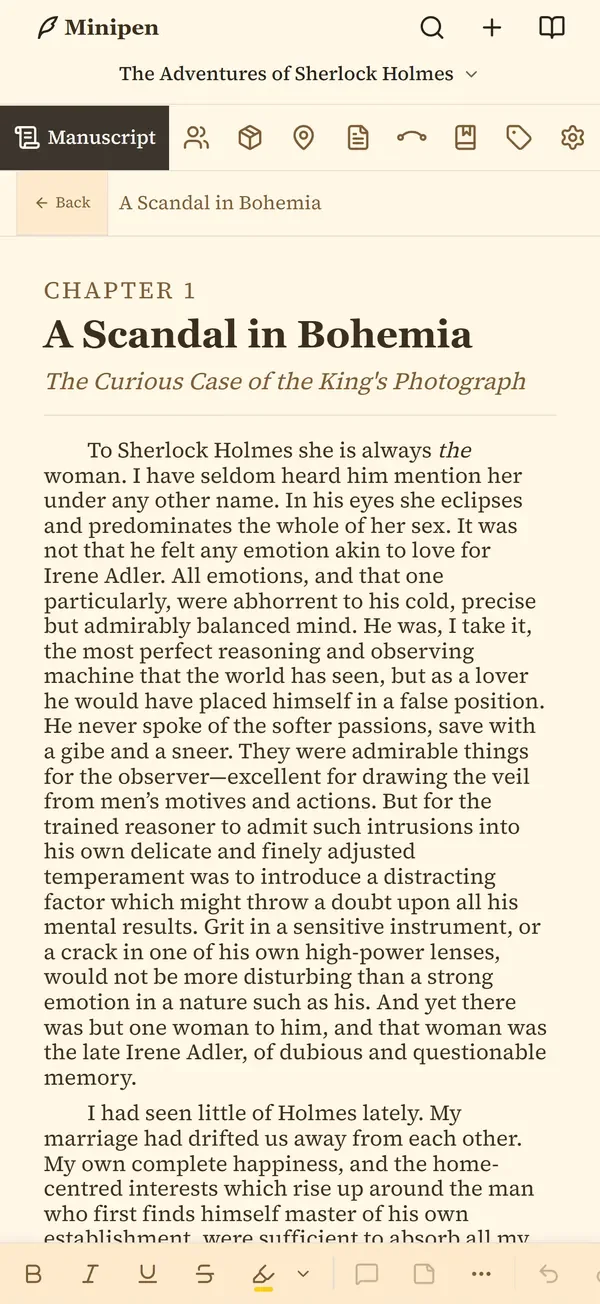
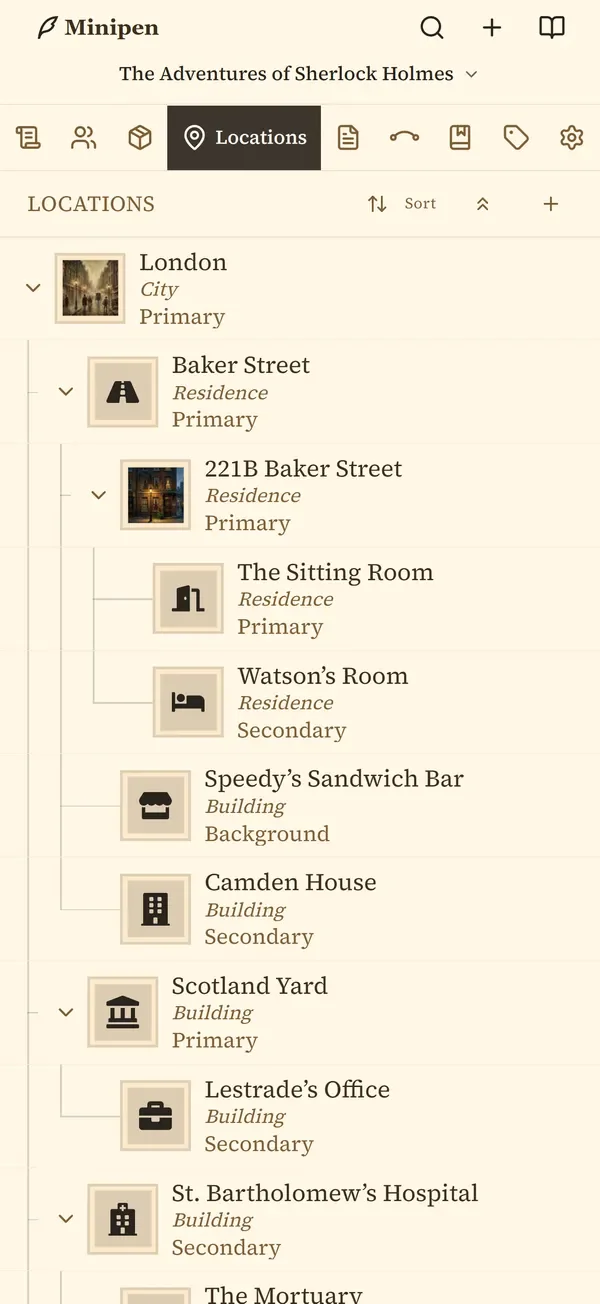
Write your manuscript and look up your characters, places, and notes on your phone. Everything you change is waiting on your computer.
Private
Encrypted before it leaves.
Your books are encrypted on your computer with a password only you know. Penpoint stores them and can't read them.
How it works
Your computer, the cloud, and your phone.
Penpoint still saves everything to your computer first. Cloud keeps a second, encrypted copy and passes your changes between your devices.
Your computer
Penpoint
Where your books live. These are the originals.
In between
Penpoint Cloud
An encrypted copy, with every earlier version.
Your phone
Minipen
Signs in and brings your books along.
Lose the Wi-Fi and you keep writing. Everything saves on your computer as usual, and the cloud catches up on its own when you're back online. If you ever cancel, the books on your computer don't change at all.
Minipen, the Penpoint phone app
Ten minutes on the bus still counts.
Read and write your manuscript, check on a character or a place mid-scene, and add notes wherever you are. When you get back to your desk, everything you did on your phone is waiting in Penpoint.

Launching this NovemberiPhoneAndroid
Minipen comes with Penpoint Sync. It needs Penpoint on a computer, where you set up your Cloud account, then you sign in on your phone with the same email and password. iPhone with iOS 16.2 or later, or Android 7.0 or later.
Private by design
Only you can read it. Not even Penpoint.
Your password locks your books. Before a book leaves your computer, it's encrypted (scrambled so it's unreadable) with a password you choose. That password never leaves your computer, so Penpoint can store your books but can't open them.
Your Recovery Kit is the spare key. When you set up Cloud, you save 12 words somewhere safe, like a password manager or a printout. Forget your password and those 12 words get you back in.
The books on your computer are always yours. If you ever lose both your password and your Recovery Kit, nobody can unlock the cloud copy, but nothing on your computer changes. How the encryption works
Plans
Two plans. Monthly or yearly.
Penpoint Cloud is a subscription, separate from your one-time Penpoint purchase. Pick a plan inside Penpoint when you set up Cloud.
Penpoint Backup
Backup
For writing on one computer, with a safe copy off it.
$5a month
or $45 a year
- An encrypted cloud copy of every book
- Unlimited version history: restore any earlier draft
- Backs up from one computer at a time
Penpoint Sync
Includes MinipenSync
For writing on more than one computer, and on your phone.
$10a month
or $96 a year
- Everything in Backup
- Up to 5 computers kept in step
- Minipen, the Penpoint phone app
Prices in US dollars; tax is added at checkout where it applies. Cancel any time from Settings > Penpoint Cloud inside Penpoint, with no phone call or email. A canceled plan runs to the end of the time you paid for. Cloud subscriptions are non-refundable and not prorated. Plan details
How to start
Set it up once, on your computer.
It takes a few minutes. After that, every book in your library uploads by itself.
-
Get the latest Penpoint
Penpoint Cloud is built into Penpoint on Windows, macOS, and Linux. Already have it? Update to the newest version. New to Penpoint? Start with the free trial.
Try Penpoint free -
Open Settings and choose a plan
Go to Settings > Penpoint Cloud and click Set up Penpoint Cloud. Enter your email and the 6-digit code it sends you, then pick Backup or Sync. Checkout opens in your browser, and Penpoint notices when it's done.
-
Make a password and save your Recovery Kit
Choose the password that encrypts your books, then save your 12-word Recovery Kit somewhere other than this computer. Your books start uploading right away, and you can keep writing while they do. Full setup guide
Questions
Common questions
Do I need Penpoint Cloud to use Penpoint?
No. Penpoint is a one-time purchase and works completely offline, with no account. Penpoint Cloud is an optional subscription that adds an encrypted cloud copy of your books, sync between computers, and Minipen, the Penpoint phone app.
How much does Penpoint Cloud cost?
Penpoint Backup is $5 a month or $45 a year. Penpoint Sync is $10 a month or $96 a year and includes everything in Backup, up to 5 computers kept in step, and the Minipen phone app. Tax is added at checkout where it applies.
Can Penpoint read my books in the cloud?
No. Your books are encrypted on your computer with a password only you know, before anything is uploaded. Penpoint stores them but cannot read them. More on the password and Recovery Kit
What happens to my books if I cancel?
The books on your computer are the originals and nothing happens to them. Cloud keeps working until the end of the time you paid for. After that the cloud copy is kept for 30 days, then deleted, with warning emails first.
Changed your mind before your paid time runs out? A Resume button in Settings > Penpoint Cloud switches you straight back on.
What if I forget my password?
Use your Recovery Kit, the 12 words you save when you set up Cloud, to choose a new password. If you lose both the password and the Recovery Kit and no computer is still signed in, nobody can unlock the cloud copy. The books on your computer are not affected.
Which phones does Minipen run on?
iPhone with iOS 16.2 or later, and Android 7.0 or later. Minipen comes with Penpoint Sync, and it launches this November. You set up your Cloud account in Penpoint on your computer first, then sign in on your phone.
Does Penpoint Cloud work offline?
Yes. Penpoint always saves to your computer first, so you can keep writing with no connection. Cloud catches up on its own when you're back online.
Write anywhere. Keep every draft.
Penpoint is $40 once, and Cloud is there when you want it.