Scrivener Alternative
Penpoint vs Scrivener: a Scrivener alternative with worldbuilding built in
Scrivener organizes your manuscript. Penpoint organizes your manuscript and your world. Here is the honest head-to-head, including the things Scrivener still does better.
Last checked: September 2026
The short answer
Scrivener is a better manuscript compiler. If your priority is assembling a finished book and exporting it to exact print specifications, Scrivener has spent twenty years on that problem and it shows.
Penpoint is a better story bible. If you keep losing track of who knows what, which town the inn was in, or whether you already used that name in book one, that is what Penpoint was built for.
Scrivener is $59.99 per platform. Penpoint is $40 once, for every platform you own.
Penpoint vs Scrivener at a glance
← Scroll to compare →
| Penpoint$40 lifetime | Scrivener$60/platform | |
|---|---|---|
| Price | $40 onceAll platforms | $59.99Per platform |
| Platforms | Windows, macOS, Linux | Windows, macOS, iOSNo Linux |
| Manuscript editor | Full | Full |
| Worldbuilding | Characters, locations, items, arcs, relationships, notes | NoneDocuments in the Binder |
| Works offline | Yes, always | Yes, always |
| Series support | One file, shared cast | ManualA folder per book |
| Builds your story bible from your prose | Chapter ScannerFinds characters, locations and items in your writing and creates the entries | NoYou type it up yourself |
| Rename a character and fix every link | YesWorldbuilding @links update themselves; prose stays plain text | Find and replace |
| Timeline and relationship views | IncludedRelationship map, story and character arcs, character-by-chapter timeline | NoneScapple sold separately, $20.99 |
| Spellcheck that knows invented names | AutomaticEvery character, location and item is added for you. 60 languages, all three platforms | ManualOffline spellcheck, but you add each name yourself |
| Search across prose and worldbuilding | One searchProse, entries, notes and tags at once; every book in a series | Project searchSearches the documents in one project |
| Split-screen editing | No | YesUp to four documents at once via split editor, Copyholders and Quick Reference |
| Scriptwriting formats | NoBuilt for novels | YesScreenplay, stage and radio templates |
| Free trial | 14 daysEvery feature, no account or card | 30 days of useCounts only days you open it, so it can last months |
| Print typesetting control | Basic export | DeepCompile engine |
| Distraction-free writing | Zen mode + Flowstate sprints | Composition Mode |
Scrivener has no worldbuilding features. That is not a knock on it. It was built to organize and compile a manuscript, a problem it has spent twenty years on.
What Scrivener gets right
Scrivener describes itself as “Typewriter. Ring-binder. Scrapbook. Everything you need to craft your first draft.” That is an honest description of the app, and it has been accurate for twenty years.
The Binder holds the whole project
Everything lives in the Binder, the panel down the left side: chapters, scenes, character sketches, a research PDF, all in one outline you can drag around. Splitting a chapter is a keystroke, reordering an act means dragging a folder. For a writer who kept a novel in a stack of Word files, the Binder alone is worth the price.
Three ways to look at the same manuscript
The corkboard shows every scene as an index card, and rearranging the cards rearranges the manuscript underneath. The outliner shows the same material as a sortable table with word counts and status columns. Scrivenings mode stitches documents into continuous text, and Composition Mode strips the screen to the page. Four views, one set of files.
Templates and word targets
Projects start from a template: novel, novella, short story, non-fiction, or a screenplay with industry layout. Project and session targets track your deadline and your day.
Twenty years of accumulated knowledge
Scrivener launched in 2007. There are courses, YouTube channels, downloadable templates, and whole books about it, so whatever you are stuck on, someone has already written the answer and probably filmed it. Penpoint launched in March 2026 and has nothing of the kind.
Why writers look for a Scrivener alternative
Everything you need to craft your first draft. That promise also marks a boundary, because a first draft is one book. People go looking when they reach book two, or chapter forty of book one, and find that a ring-binder full of documents is something you maintain by hand. Five reasons come up most.
The setup burden
Scrivener does a great many things, and it expects you to arrange them yourself before you write anything. The usual on-ramp is a few hours of tutorials, and plenty of writers use maybe a fifth of the app for years afterward. If your first evening with a writing tool ends with a half-built template instead of a scene, that is the complaint.
You build the story bible by hand
Scrivener has no character list, no location entries, and no way to link one to another, only a Binder full of documents. Want a cast list? Make a folder and type it. The structure is yours to invent and yours to maintain, which is freedom right up until the project gets long.
The per-platform license
Scrivener is licensed for macOS or Windows, not both. Write on a desktop at home and a laptop somewhere else and you buy it twice.
No Linux
There is no Linux version, and for writers on Linux that is not a preference, it is a wall. It is the single most common reason we hear that someone came looking in the first place.
It was not built for a series
Book two is a new project. Your cast is copied over, recreated, or looked up in book one every time you need it. That is tidy for a standalone novel and awkward the moment a second book needs the same characters.
Where Penpoint is different
Scrivener organizes documents. Penpoint organizes documents and the people, places, and events inside them, which is the one capability Scrivener has never had. The story bible is part of the app instead of something you build inside it.
It is already set up when you open it
A new Scrivener project is a blank Binder and a template, and the structure that makes it useful is structure you build. That is why there is a whole genre of three-hour YouTube videos on configuring Scrivener before writing a word.
Penpoint ships with the structure already there. Characters, locations, items, events, arcs, and chapters are things the app already understands, with fields, relationships, and links working from the first minute. You do not design a character sheet, you fill one in. You open a new book and the worldbuilding is waiting.
Your world lives in the same file as your manuscript
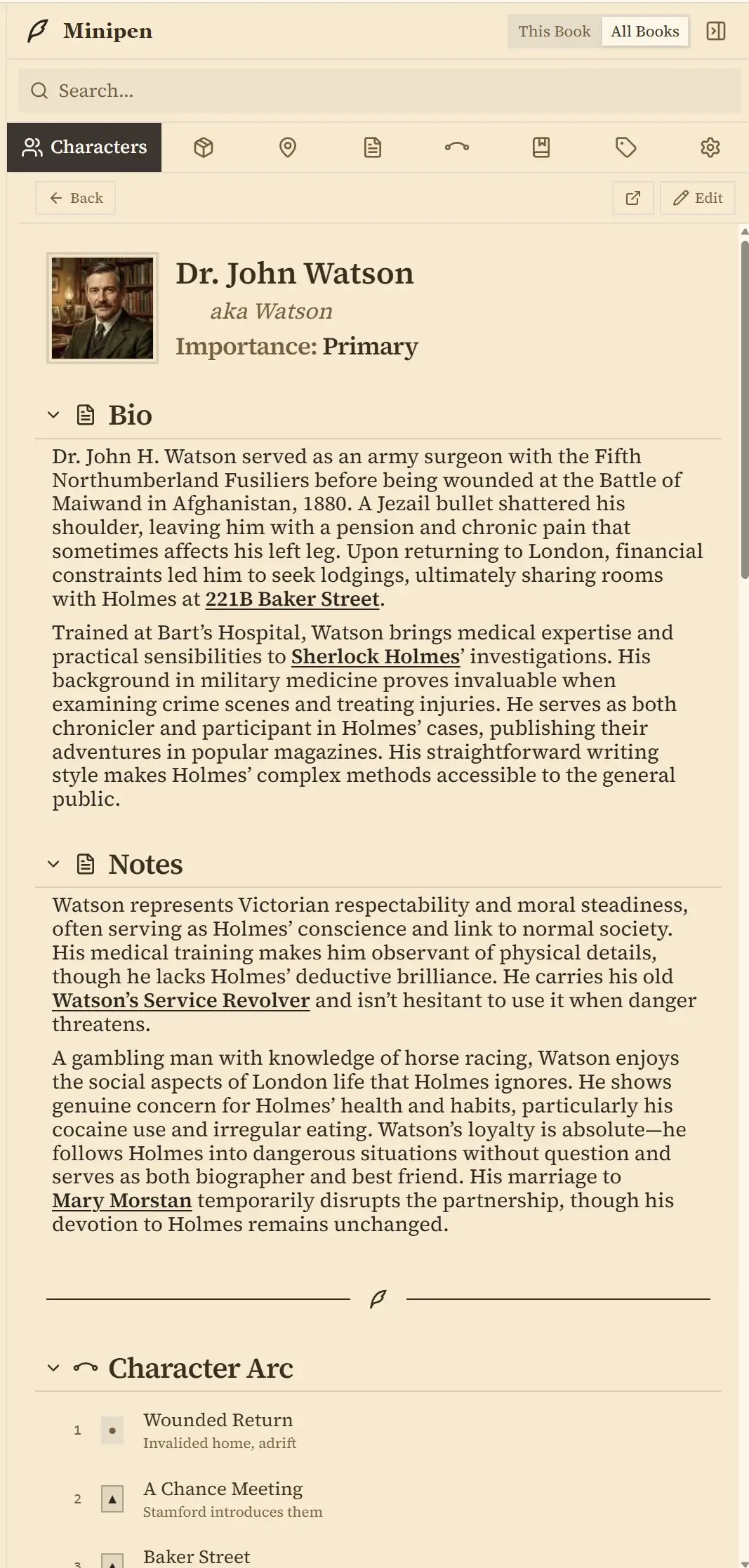
The setup most writers describe before they switch is a word processor for the prose, a spreadsheet for the timeline, and a folder of notes for everything else. Scrivener consolidates the first and the last of those, and does nothing about the rest.
Penpoint keeps all of it in one book file, and as entries rather than documents. A character has relationships, an arc, the chapters they appear in, and whatever fields you decide to add, so a detail changed once is correct everywhere that character appears. While you write, the Minipen sidebar keeps that world open next to your prose.
One search reaches the lot. Ctrl+K looks through your prose and your entries at once, and in a series it covers every book. Scrivener's project search is good, but it searches the documents in one project, because documents are all there are.
Names that stay correct when you change them
Type @ in any worldbuilding field, a note, or a character's description, and you get a real link to that entry rather than a typed name. Rename the character in month nine and every one of those links updates itself. In the manuscript editor @ works as a name picker instead and inserts plain text, because prose should be words rather than markup. Scrivener has no equivalent in either place, so a rename there means find-and-replace and hoping you caught the possessive forms.
The spellchecker knows your invented names too. Every character, location, and item you create is added to the dictionary automatically, so Aldric stops being underlined in red the moment he exists. It runs fully offline in 60 languages. If you write fantasy or science fiction, this is the difference between a clean document and a page of wrongly underlined words you learn to ignore.
You can see the shape of the story
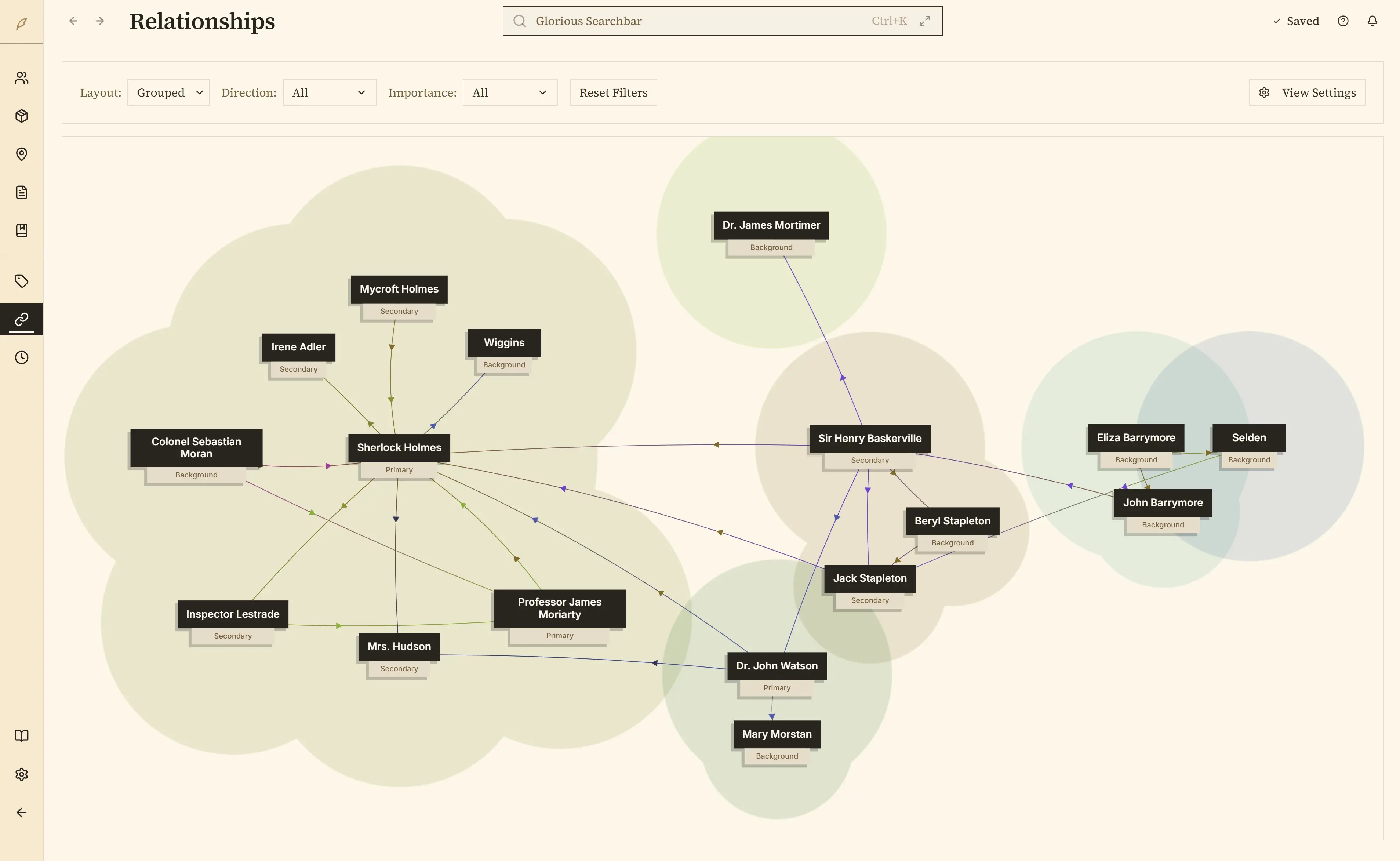
Penpoint draws a relationship map of your cast, plots structure as layered arcs with keyframes at each turning point, and tracks a character's emotional fortune as a curve you can overlay against others. A timeline shows where each character appears across chapters, which is usually where you notice someone vanished for nine of them. There is a corkboard too.
Scrivener has an outliner and a corkboard. For plotting shape, its answer is Scapple, a separate mind-mapping application that connects to Scrivener only loosely.
The Chapter Scanner
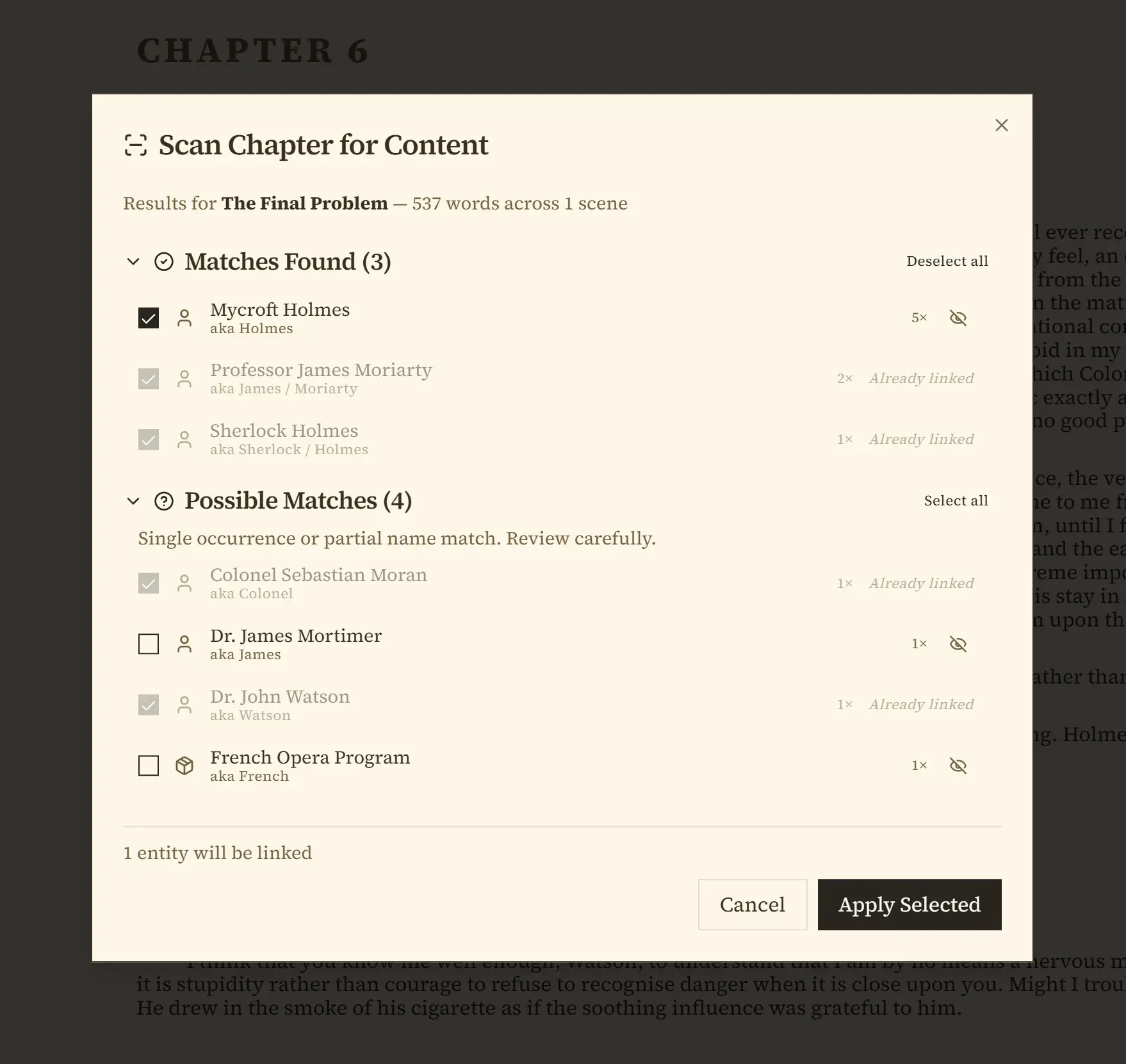
Right-click a chapter and Penpoint reads your prose, finds every character, location, and item mentioned, and offers to create the ones that do not exist yet. Import a finished 90,000-word draft and you can have a full character bible the same afternoon.
It does not guess silently. Results come back in two groups: confident matches, and possible matches, which are the single mentions and partial name hits it wants you to look at before agreeing. Nothing is created until you tick it and press Apply, so a wrong guess costs you a glance rather than a cleanup.
Scrivener has nothing like it, and neither do Dabble, Campfire, or World Anvil.
Two ways to stop editing and write
Scrivener has Composition Mode, which blanks the screen down to the page. Penpoint has the same idea in Fullscreen Zen mode, where the interface fades out and the sidebars get out of the way.
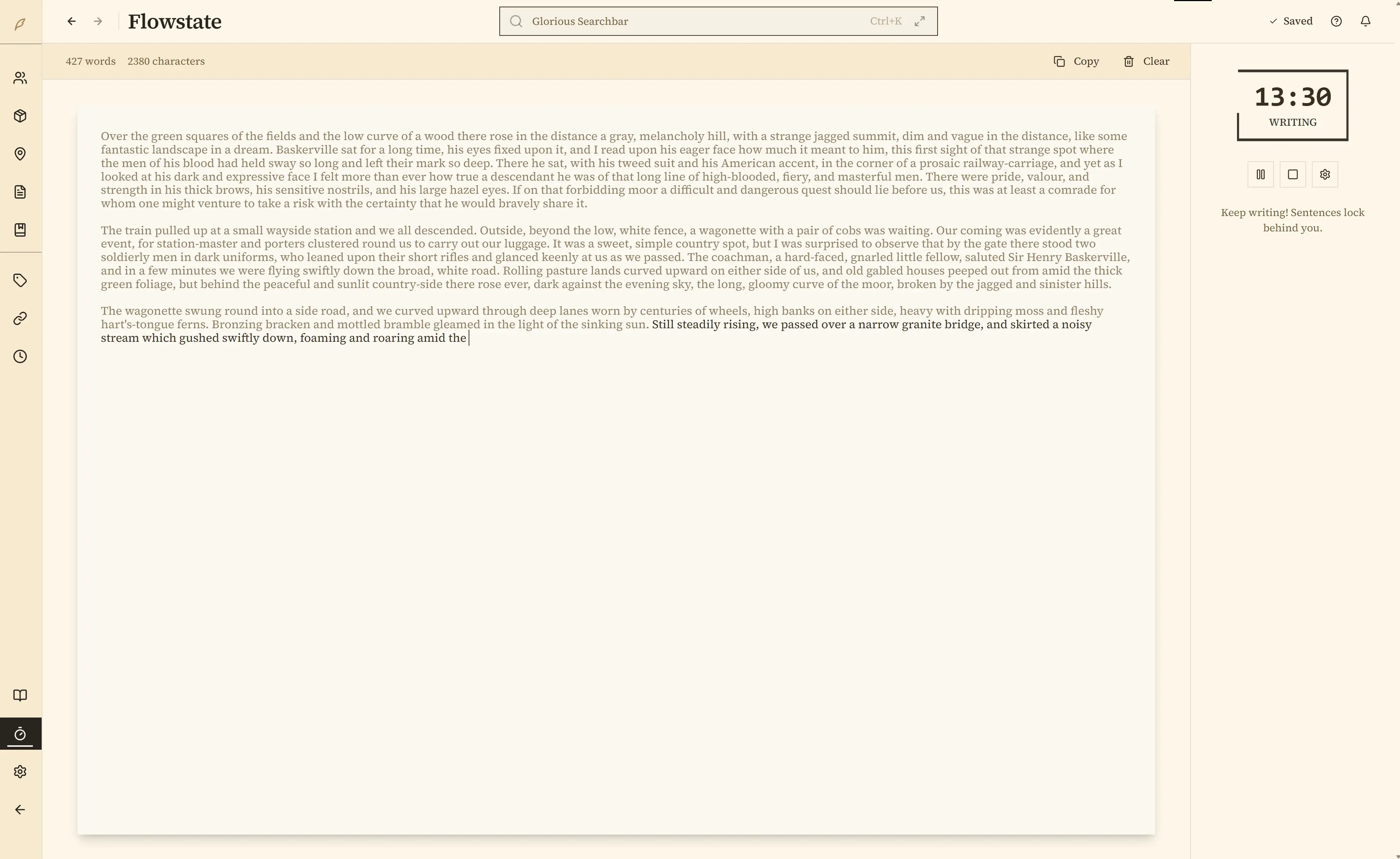
Flowstate is the one Scrivener has no answer for. Start a timed sprint and sentences lock behind you as you type, so you physically cannot go back and rewrite the same paragraph a seventh time. Timed cycles alternate between forward-only writing and editing windows. It exists because revising in circles is a different problem from being distracted, and no amount of hiding the interface fixes it.
Built for invented worlds
Nested locations go as deep as you need: Kingdom, City, Tavern, the cellar under it. Items track who owns what and where it is now. Custom calendars take invented months, weekdays, leap days, eras and up to eight moons, and you date events against them. Rich-text tables hold magic systems, faction grids and stat blocks. The Compendium keeps an alphabetical index of all of it, updated as you write.
Everything that does not belong on an entry goes in the Notebook: research, images, scraps, the half-formed idea you had on a train. It takes folders and pictures, and it lives in the same book file as the rest, so the note about your magic system is not in a different app from the magic system.
None of this exists in Scrivener. You would keep it in documents and maintain it yourself.
A series is one file
Penpoint turns one book into a Series: shared cast and world across every volume, each book keeping its own manuscript, chapters, and arcs. Edit a character once and they are current everywhere. Series Arcs plot the threads that run the whole saga. It is reversible, so you can split a series back into standalone books whenever you want.
One price, every computer, Linux included
Scrivener licenses per platform, so a Windows desktop and a MacBook is $59.99 twice. Penpoint's $40 covers Windows, macOS, and Linux.
Linux is a real supported build, an AppImage and a .deb, built and tested alongside the other two. No WINE, no compatibility layer, no community port that breaks on the next release. Scrivener has nothing there, and for writers on Linux that is usually the whole decision.
What Scrivener still does better than Penpoint
None of that makes Scrivener the wrong choice. Six things it still does better, and the last two are the ones that most often decide it.
Compile
Scrivener's compile engine is the deepest export system in writing software. You can control formatting down to individual section types, build your own templates, and hit a publisher's exact print specification. Penpoint exports clean files to Word, PDF, EPUB, RTF, Markdown, and plain text. It does not give you that level of typesetting control, and if you self-publish print editions you will feel the difference.
Split-screen and multiple windows
Scrivener can split the editor, pin reference documents in Copyholders, and float Quick Reference panels, putting up to four documents in front of you at once. Penpoint cannot. The Minipen sidebar keeps worldbuilding beside your prose, which covers the common case, but you cannot put chapter three and chapter forty side by side. If you revise by comparing two scenes, that is a real loss and you should know before you switch.
Snapshot comparison at three levels of detail
Scrivener compares a snapshot against your current text and highlights what changed, and it lets you pick how fine that comparison is: by paragraph, by clause, or by word. Penpoint has whole-manuscript snapshots and per-scene drafts with undo-safe restore, and it compares a draft against the current text side by side with the changes marked. What it does not offer is a choice of how closely it compares, which is the difference between spotting a rewritten scene and spotting a swapped adjective.
A system you design yourself
Literature & Latte put it plainly: “Scrivener won't tell you how to write.” That openness is a burden if you want a finished scene on your first evening, and the entire appeal if you enjoy building the system. Those are two different writers. The Binder will hold anything in any arrangement, you can attach custom fields, labels, and status flags to any document, then filter and sort the outliner by them. If designing your own system is part of how you think, Scrivener is better at that than Penpoint and it is not close. Penpoint decided the structure for you instead: fields belong to a character, not to just any document. A Scrivener setup you have spent years refining will not come across, and that is a genuine reason to stay.
Scriptwriting, and a longer runway to decide
Scrivener ships screenplay, stage play, and radio formats with industry layout, formatting each line as dialogue, action, or a scene heading as you type. Penpoint has nothing equivalent and is not trying to; it is built for novels. Its trial is also the more generous one: 30 days of actual use rather than calendar days, so opening it twice a week stretches it over months. Penpoint's 14 days are calendar days, every feature unlocked, no account or card, and that is a shorter runway.
Writing on a phone or tablet
Scrivener has an iPad and iPhone app for $23.99 that syncs through Dropbox. Penpoint is desktop only today. A writer who drafts on a commute needs Scrivener, and nothing else on this page changes that.
Penpoint and Scrivener pricing compared
| Penpoint | Scrivener | |
|---|---|---|
| License | $40 once | $59.99 per platform |
| macOS + Windows | Included | $95.98 bundle |
| Linux | Included | Not available |
| iOS | Not available | $23.99 |
| Mind mapping | Included | Scapple, $20.99 |
| Educational discount | No | $50.99 |
| Updates | Free within a major version | Free within a major version |
Both are one-time purchases. Neither is a subscription, which is rare in this category: Dabble's lifetime plan is $699 and World Anvil's top tier is $1,350. You can see all five side by side on the full comparison page.
Two of those rows go Scrivener's way. It sells a $50.99 educational license and Penpoint has no student pricing, which roughly halves the gap for a student buying one platform. Updates are the same deal either way: free within a major version.
Penpoint comes with a 30-day money-back guarantee, no questions asked.
Which one should you choose?
Scrivener has earned its twenty years, and if your manuscript is finished and what is left is exact print formatting, it is still the better tool for that job. Scrivener is the better tool if your problem is the manuscript itself. Penpoint is the better tool if the problem is everything around it.
Choose Scrivener if
- You need precise control over print formatting
- You already know its compile system
- You revise by comparing two documents side by side
- You write scripts as well as prose
- You want an iPad app with years behind it
- You would rather design your own system than accept someone else's
- Your project is a manuscript rather than a world
If your book is written and all that is left is layout, switching now buys you nothing.
Choose Penpoint if
- You are tracking a cast across a long book or a series
- You want your worldbuilding in the same app as your prose
- You write on Linux, or on more than one operating system
- You would rather start writing than spend an evening setting a tool up
- You would rather pay once than pay monthly
- You have ever stopped mid-sentence to go looking for how you spelled a name
Try it free for fourteen days. Every feature unlocked, no account and no credit card.
Penpoint keeps them in one file.
Penpoint vs Scrivener: common questions
Can Penpoint open a .scriv file?
No. Compile to .rtf in Scrivener and import that. Penpoint reads Scrivener's RTF output directly and detects your chapters from it.
How do I move a Scrivener project into Penpoint?
Compile the whole draft to RTF in Scrivener, then choose Import from Penpoint's manuscript toolbar. Penpoint shows you the chapters it found before it writes anything, so you can correct the split first. Then run Scan Chapter for Content and your characters, locations, and items become entries linked to the chapters they appear in, which is the step that turns an imported manuscript into a story bible. Research folders, images, and notes do not travel inside a compiled manuscript, so those move across separately into the Notebook.
Reading .scriv projects directly is planned. We have taken apart real Scrivener projects to work out what can carry across, including keywords, labels, and your Characters and Places folders. There is no date on it, so compiling to RTF is the route that works today.
Will Penpoint find my chapters if they are not called “Chapter One”?
Penpoint finds chapter breaks from heading styles or from the title text, so “Chapter 9”, “Part II” and “Prologue” are recognized whatever styling they carry. Bespoke titles like “The Drowning” are the hard case: with no heading style applied, the book imports as one long chapter you split yourself, roughly twenty minutes on a forty-chapter novel. Applying a heading style in Scrivener before you compile avoids it, and the import preview shows which way it went before anything is written.
What does not transfer from Scrivener, and is my project safe?
Compile presets, custom metadata fields, snapshots, and comments do not transfer, so export anything you need to keep before you switch. Your Scrivener project itself is untouched. Installing Penpoint moves nothing and deletes nothing, and you can run both while you decide.
Does Penpoint have the Binder?
Penpoint has an outliner and a corkboard that do the same job for chapters and scenes. What it lacks is the Binder's habit of holding any kind of research document, because research lives in the Notebook and on character, location and item entries instead. Penpoint's structure is more fixed than Scrivener's, which is what makes the linking between entries possible.
Does Penpoint have Copyholders, Quick Reference, or Scrivenings mode?
No to all three. Copyholders pin a second document beside the one you are editing, Quick Reference floats one in its own window, and Scrivenings stitches a stack of documents into a single scrolling draft. Penpoint has no equivalent to the first two; it shows one chapter at a time, with the Minipen sidebar alongside for worldbuilding. Scrivenings is the exception, because Penpoint's editor already reads chapters and scenes as continuous text.
Can Penpoint handle a 150,000-word manuscript?
Yes. Penpoint keeps each book broken into small pieces behind the scenes rather than one large document, so length affects it far less than it affects a word processor.
Does Penpoint have a distraction-free writing mode?
Penpoint has two: Fullscreen Zen mode, and Flowstate, a timed sprint that locks sentences behind you as you write. Scrivener's Composition Mode matches the first. It has no equivalent of the second.
What happens to my books if Penpoint goes away?
Your books are files on your computer and they stay that way. Writing in Penpoint needs no account, and no server has to be running for the app to open your work. Penpoint Cloud is an optional paid subscription for backup and syncing between your own devices, and switching it off changes nothing about your files. You can export the whole book at any time, including after a trial expires. Penpoint is built by one developer. Even so, your books were never held anywhere you cannot reach them.
Is Penpoint a subscription?
No. Penpoint is a one-time $40 purchase with a 30-day money-back guarantee, covering Windows, macOS, and Linux.
Can I try Penpoint before buying?
Yes. The Penpoint trial runs fourteen days with every feature unlocked, and needs no account and no credit card.
Does Penpoint use AI on my writing?
No. Penpoint does not read, analyze, or generate prose.
How do I get a refund if I change my mind?
Email support@penpoint.app within 30 calendar days of buying and we refund it, no questions asked. Refunds are processed through Lemon Squeezy; if that gives you any trouble, contact us directly and we will resolve it. The full wording is in the terms.
If my trial ends and I do not buy, what can I take with me?
Everything. The expired-trial screen has two buttons, Export Manuscript and Export Worldbuilding. Manuscripts leave as Word, PDF, EPUB, RTF, Markdown or plain text. Worldbuilding leaves as Markdown that Penpoint reads back without losing anything, so entries keep their details and links rather than turning back into plain text.
Is Penpoint still being actively developed?
Yes, and you do not have to take our word for it. Penpoint's changelog lists every release and what changed in it, and the development page shows what is being worked on now. Both are public, so you can judge the pace yourself.
Is there a Scrivener alternative for Linux?
Penpoint runs directly on Linux, shipped as an AppImage and a .deb package, built and tested alongside the Windows and macOS versions. Scrivener has no Linux version; the old beta was discontinued.
Your manuscript and your world, in one file.
Every feature for 14 days, with no account and no card. $40 once after that, for Windows, macOS, and Linux together.
Join our Discord